Reevees product · version 0.1.0

Reevees Nexus

Stop reverse-engineering modular Unity asset packs by hand. Nexus turns imported kits into a structured, reviewable profile covering semantics, geometry, grids, families, snaps, compatibility, audits and reports.

Planned launch price US$39.99 · regular US$49.99

Unity Asset Store — coming soonFull capability referenceQuick Start & FAQ
Reevees Nexus cover artwork
The job it replaces

Inspect once. Build sooner.

Nexus is designed for the repetitive work that happens before creative level design: finding prefab roles, measuring geometry, inferring modular grids, grouping families, checking snap relationships, reviewing uncertainty and documenting the results.

It does not build the level for you. It helps you understand the kit faster and makes uncertain decisions explicit instead of hiding them.

See it in Unity

The whole workflow in 76 seconds

Recorded in Unity 6 with the included sample kit and small generated example kits. No audio.

Screenshots

What you see inside the Editor

Real Nexus 0.1.0 windows. The red numbers in each image match the numbers in its caption. Select an image to open it full size.

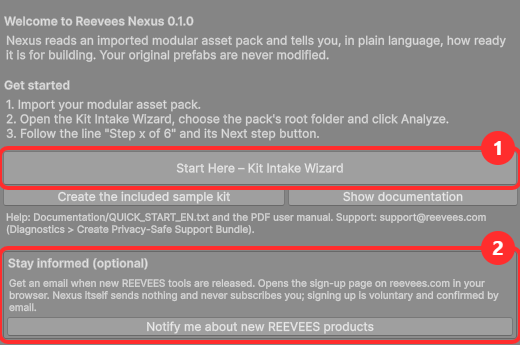
Getting Started window with the Start Here button and the optional product-updates sign-up
Getting Started. Opens once after installation: 1 Start Here – Kit Intake Wizard, plus the sample kit, documentation and support. 2 Optional: Notify me about new REEVEES products – the browser opens only when you click it.
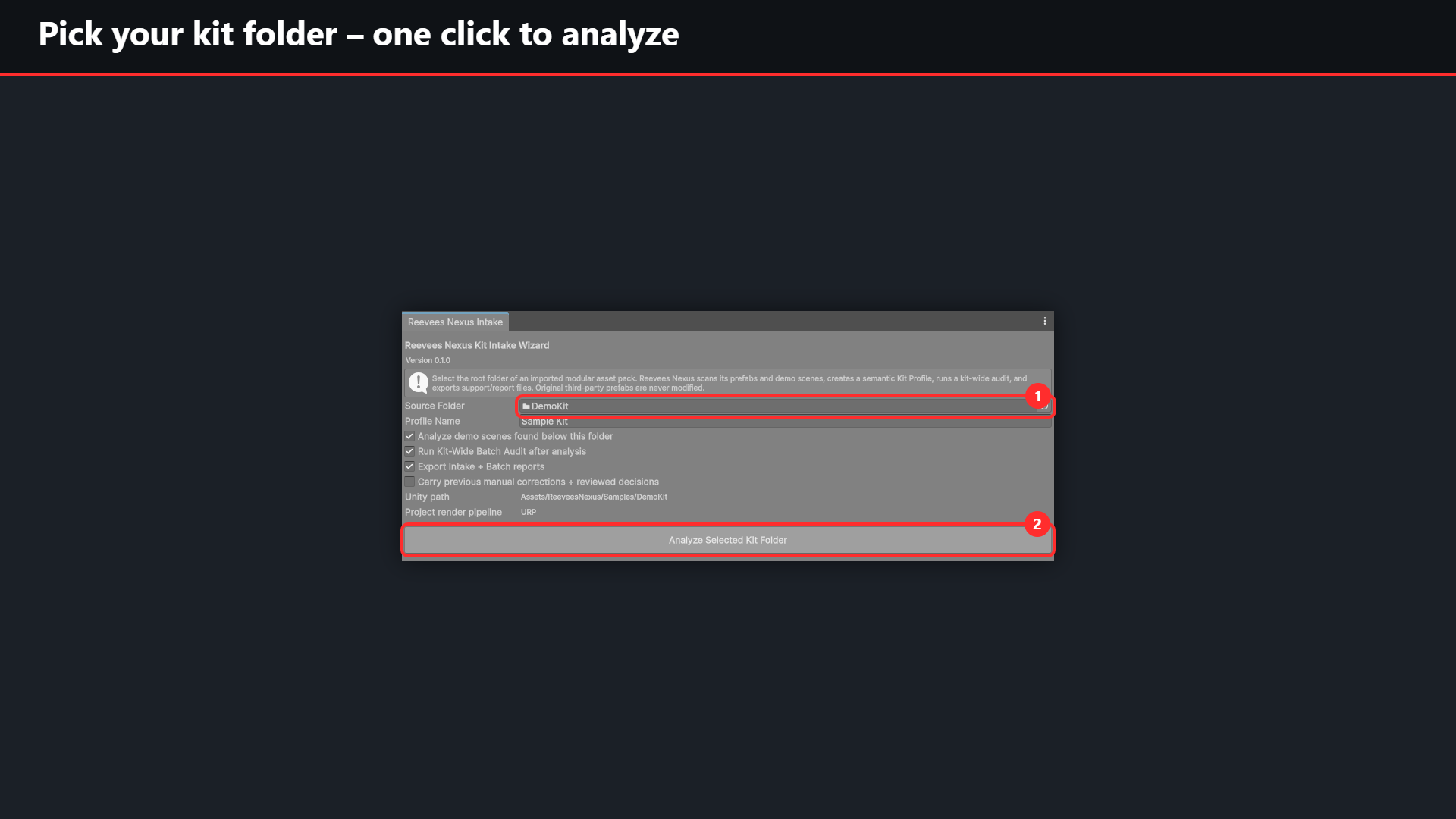
Kit Intake Wizard with the Source Folder field and the Analyze Selected Kit Folder button
Pick the kit folder. Start Here – Kit Intake Wizard: 1 choose the root folder of the kit (here the included DemoKit), 2 click Analyze Selected Kit Folder. Original prefabs are never modified.
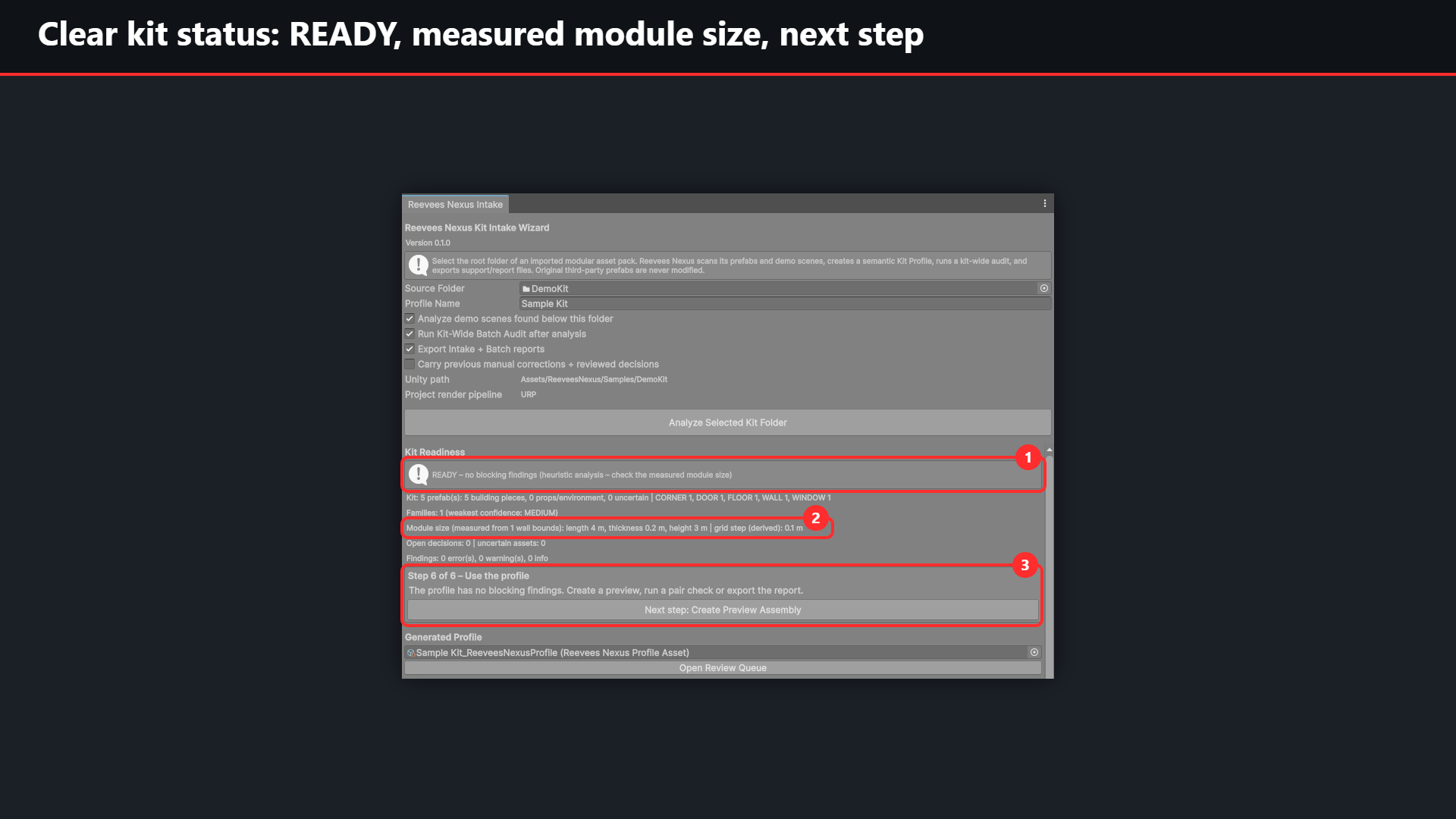
Kit Readiness READY with the measured module size and the next step
Clear kit status. 1 READY – no blocking findings. 2 Module size measured from the wall bounds (length 4 m, thickness 0.2 m, height 3 m). 3 The guided step with its Next step button.
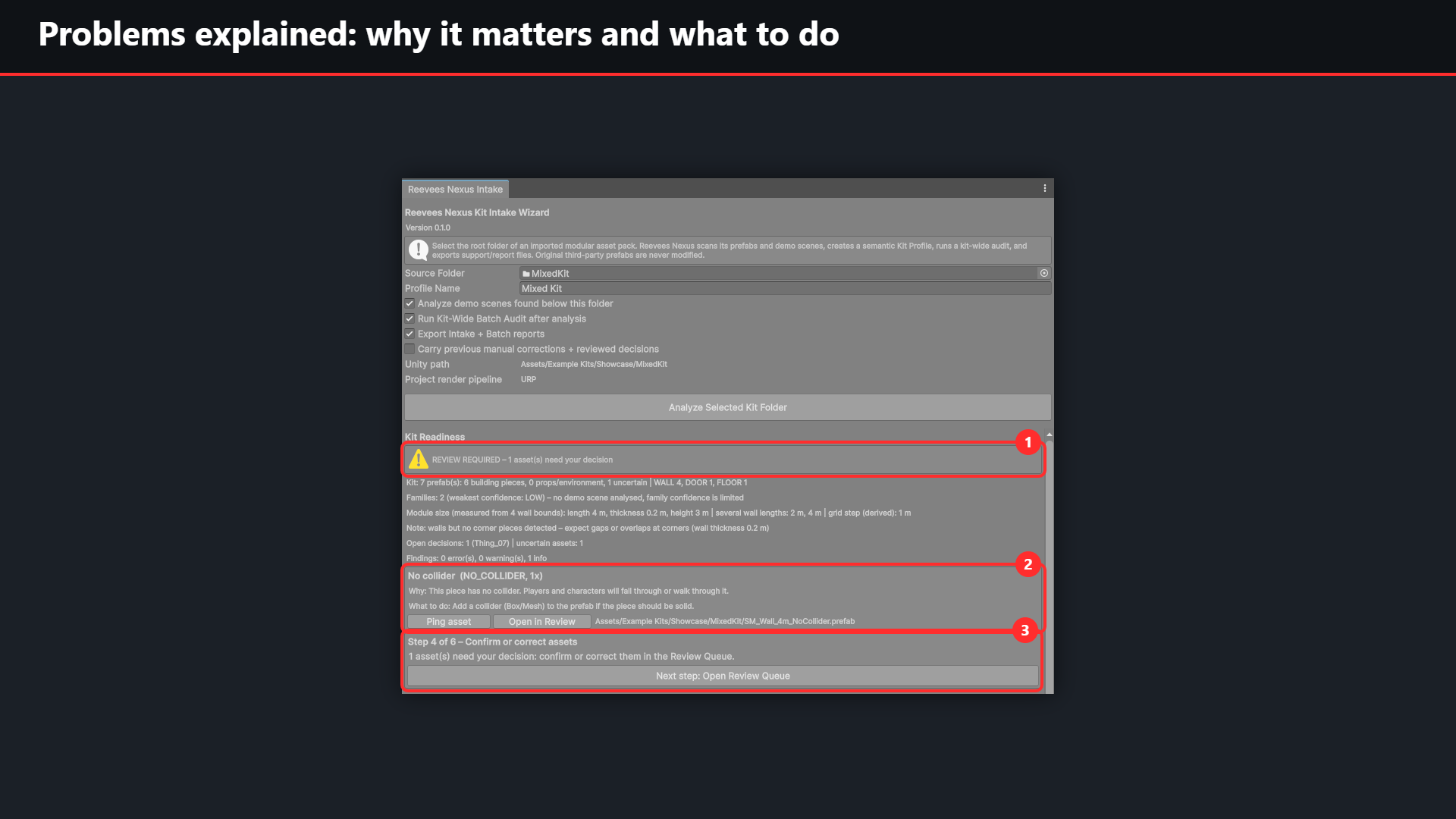
Kit Readiness REVIEW REQUIRED with an explained No collider finding
Problems explained. 1 REVIEW REQUIRED – one asset needs your decision. 2 Each finding says why it matters and what to do, with Ping asset and Open in Review. 3 The next step leads to the Review Queue.
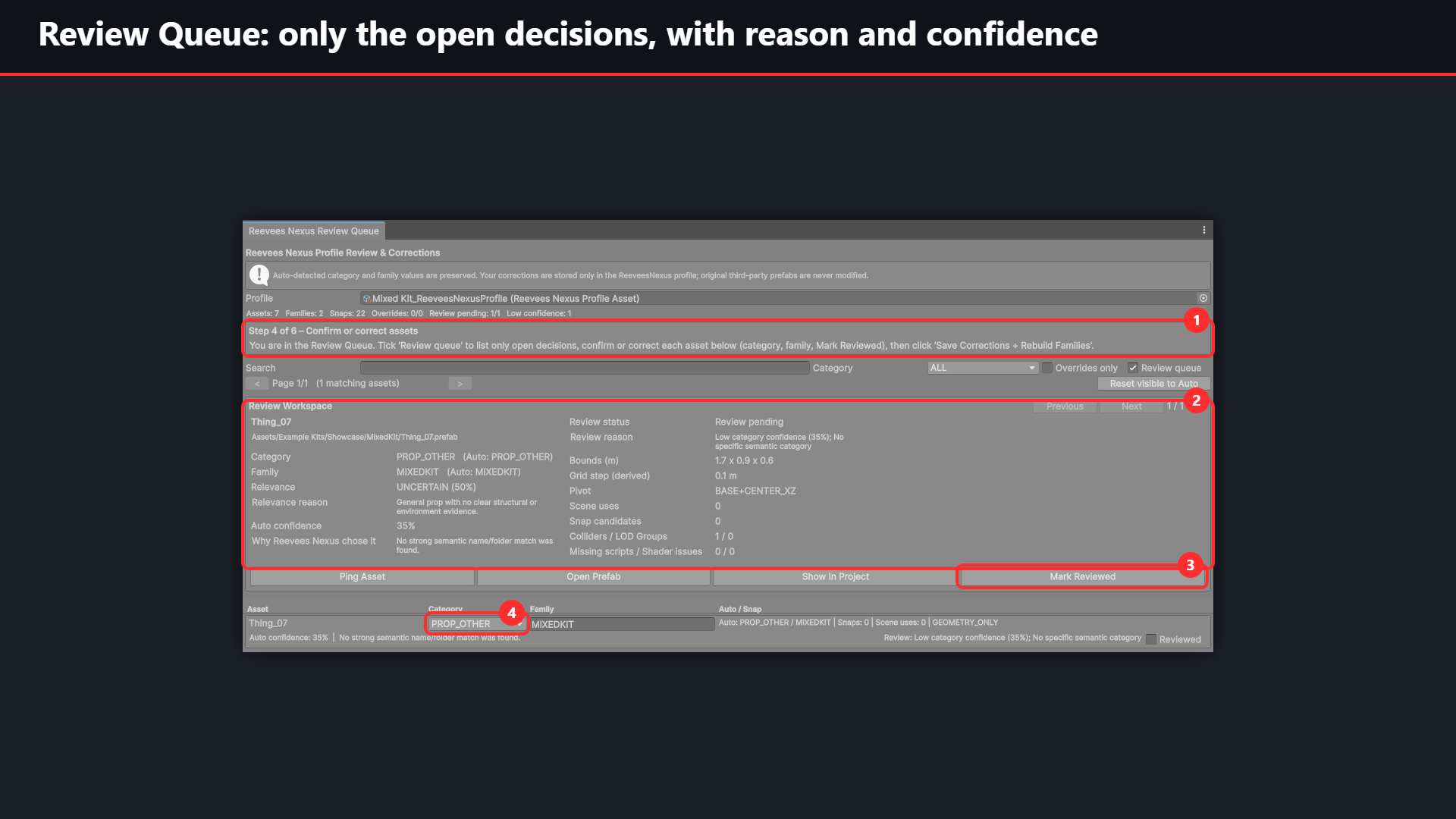
Review Queue showing one uncertain asset with review reason and auto confidence
Guided decisions. 1 The step line says what to do here. 2 The uncertain asset with category, family, review reason and auto confidence. 3 Mark Reviewed to confirm it, or 4 correct the category directly.
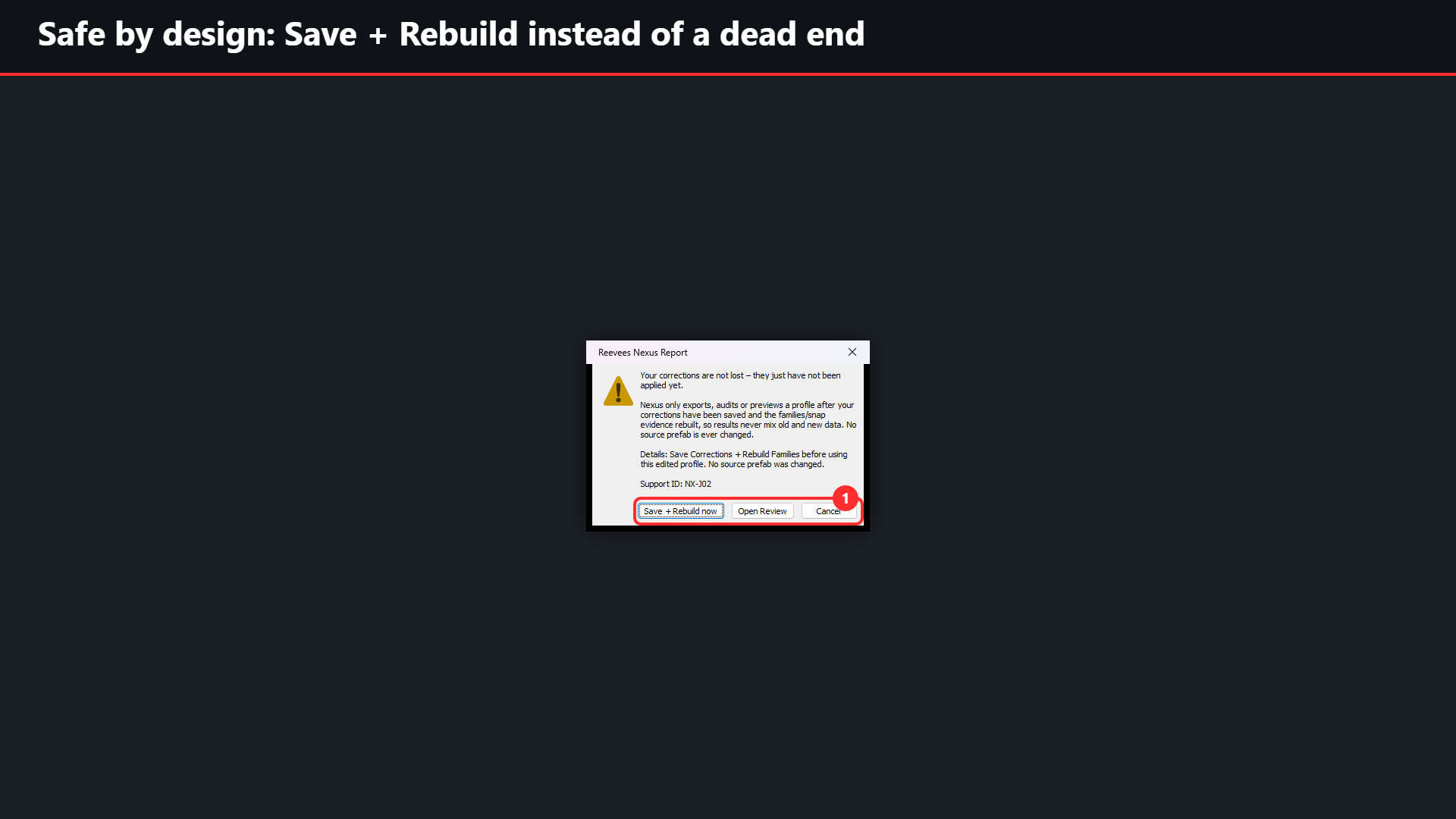
Dialog explaining that corrections must be saved, with Save + Rebuild now
Safe by design. Corrections not applied yet? Nexus explains why and offers 1 Save + Rebuild now, Open Review or Cancel, so old and new data never mix. The Support ID helps if you contact support.
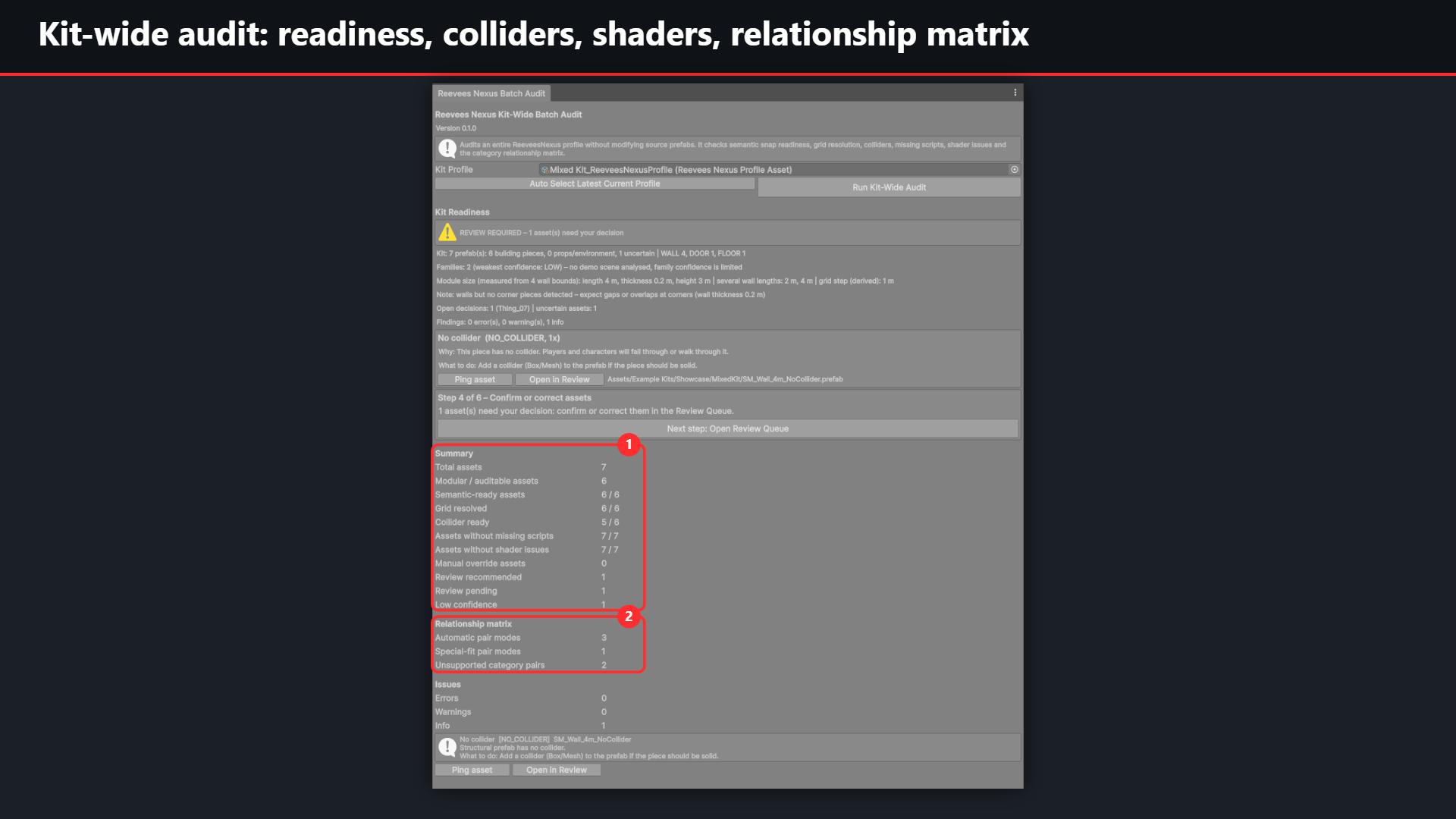
Kit-Wide Batch Audit with summary counts and relationship matrix
Kit-wide audit. 1 Summary for the whole profile: semantic readiness, grid, colliders, missing scripts, shader issues and review state. 2 Relationship matrix of the category pairs.
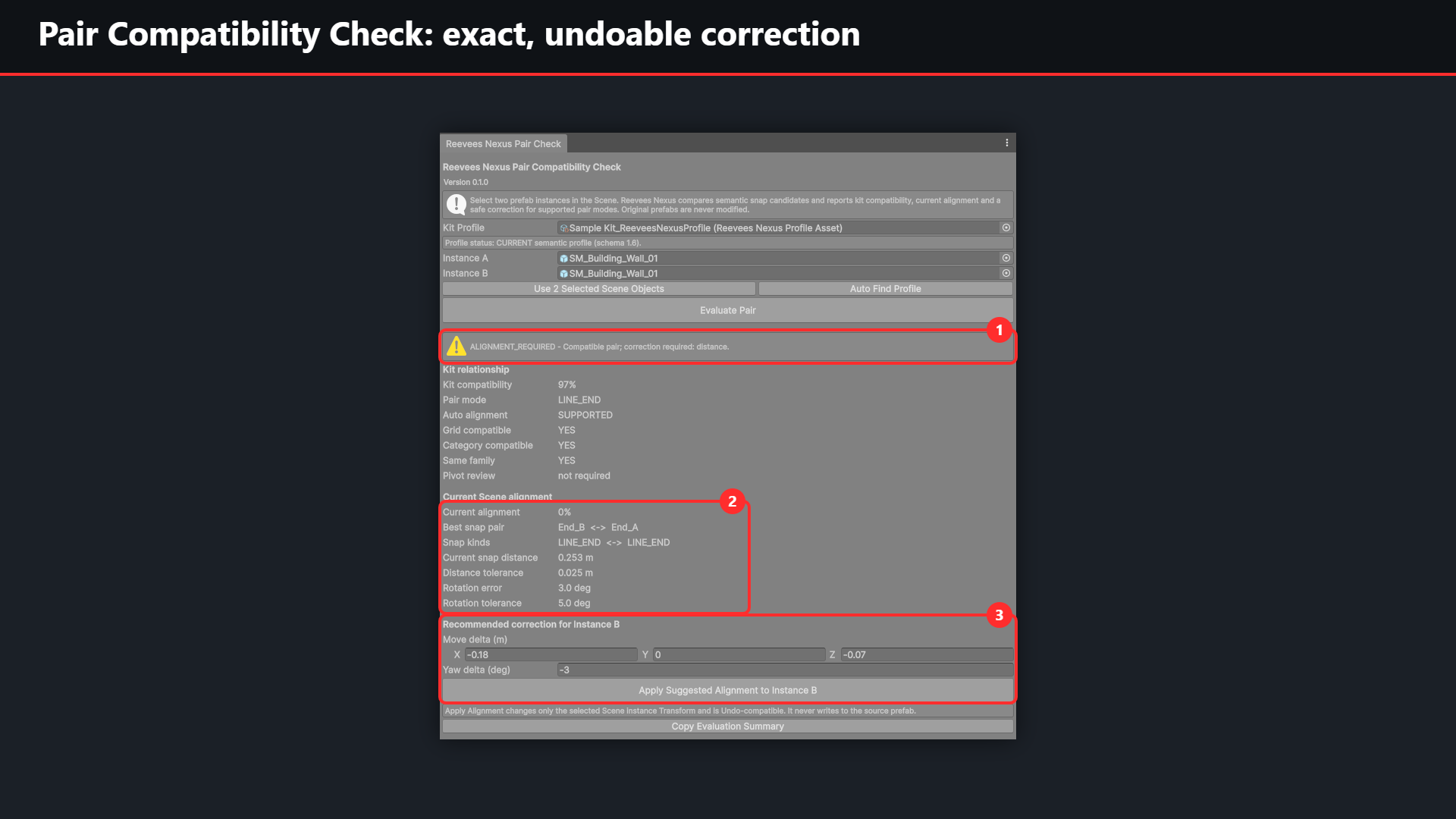
Pair Compatibility Check with ALIGNMENT_REQUIRED and a recommended correction for instance B
Pair Compatibility Check. Two wall instances, one pushed out of place: 1 compatible pair, alignment required. 2 Best snap pair, distance and rotation error against the tolerances. 3 Recommended correction for instance B; Apply changes only that scene instance and supports Undo.
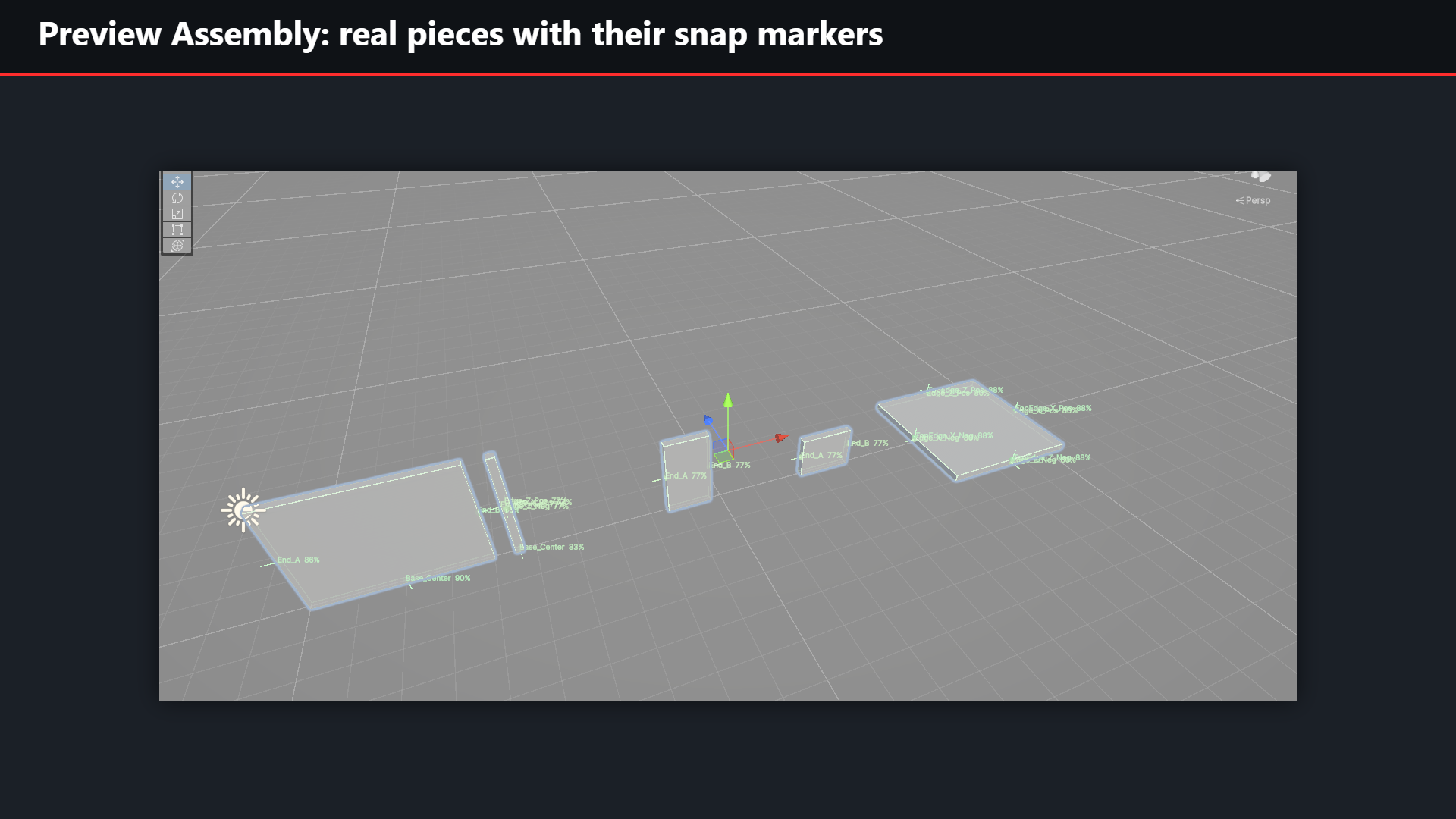
Scene view with representative kit pieces and their snap markers
Preview Assembly. Representative pieces of the profile in the Scene view, each with its snap markers and confidence. The source prefabs stay untouched.
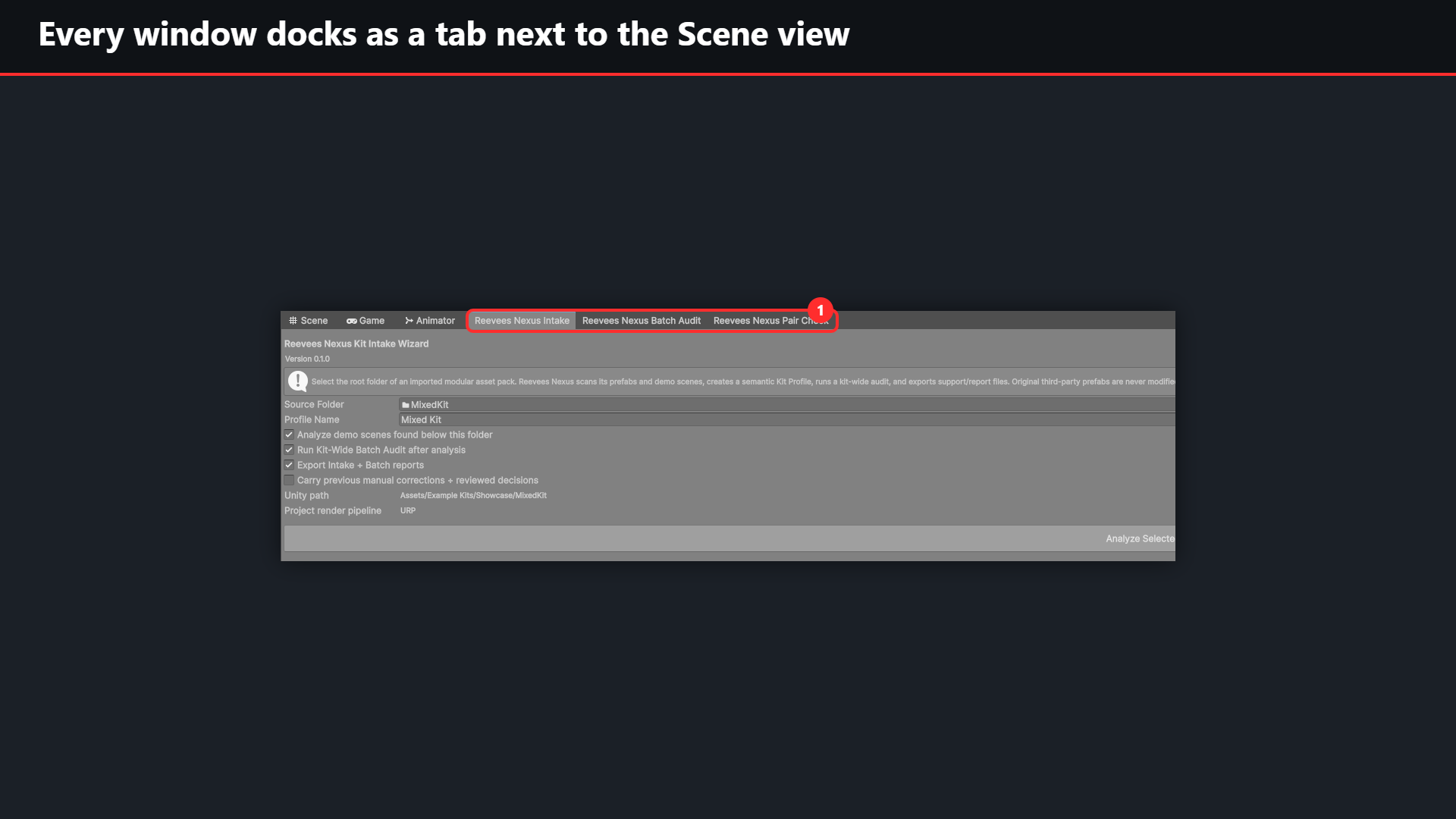
Nexus Intake, Batch Audit and Pair Check docked as tabs next to the Scene view
Fits your layout. 1 Intake, Batch Audit and Pair Check open as tabs next to the Scene and Game views.
Workflow overview

From manual kit archaeology to structured review

The Nexus workflow produces profiles, inspection objects and reports. It does not produce a completed building.

Nexus workflowInspect the kit. Keep control of the build.

A clear overview of the workflow customers use inside Unity.

  1. Import a pack

    Use the pack's required render pipeline and packages. Select its root inside Assets.

  2. Run Intake

    Scan prefabs and optional demo scenes. Create a Nexus profile and JSON. Choose optional carryover, audit and reports.

  3. Review & correct

    Inspect categories, geometry and review reasons. Save corrections and rebuild families.

  4. Inspect & compare

    View representative pieces and snap markers. Compare two instances; apply only supported, valid alignments.

  5. Export & build

    Export current reports. Use the findings for your own level work in Unity.

The output: a reviewable kit profile, inspection objects and report snapshots. Not a finished building or a guarantee that every inferred fit is correct.

Core capabilities

One tool, one connected workflow

Core features are grouped here so you can quickly see what Nexus analyzes, reviews and exports.

Kit Intake

Scan imported prefab packs, create a persistent Nexus profile and optionally use demo-scene evidence.

Semantic Analysis

Classify prefab roles with confidence, reasons and a relevance gate for structural vs. environment content.

Geometry & Grid

Analyze bounds, pivots, dominant axes, grid candidates and technical prefab metadata.

Families & Snaps

Infer families, calibration data and semantic snap candidates with confidence and evidence.

Compatibility

Compare two scene instances, separate kit compatibility from current alignment and inspect the best snap pair.

Safe Alignment

Review supported movement/yaw corrections. Apply rechecks the pair, changes only instance B and supports Undo; invalid scales or transforms are rejected.

Review Workflow

Filter, inspect, navigate and correct uncertain classifications without losing the automatic source values.

Decision Carryover

Carry category/family corrections across rescans. GUIDs take priority; conflicting valid GUIDs do not match by path. Changed review reasons reopen review.

Batch Audit

Audit semantic readiness, grid, collider, missing scripts, shader issues, confidence and relationships.

Reports & Diagnostics

Export structured reports/JSON and run product health, regression and analyzer smoke checks.

Controls

Menu and Intake options

A compact reference for the main Nexus menu and Kit Intake Wizard controls.

Menu reference

Tools > Reevees Nexus

  • Start Here – Kit Intake Wizard
  • Review Queue
  • Profile Review & Corrections
  • Kit-Wide Batch Audit
  • Pair Compatibility Check
  • Create Preview Assembly From Selected Profile
  • Export Report From Selected Profile
  • Advanced – Modular Kit Analyzer
  • Diagnostics > Run Product Health Check
  • Diagnostics > Create Privacy-Safe Support Bundle
  • Diagnostics > Run Core Self-Test
  • Diagnostics > Ensure Included Sample Kit
  • Help > Getting Started (opens once after installation)
  • Help > Notify me about new REEVEES products (optional; only opens the public sign-up page in your browser, Nexus itself sends nothing)
Kit Intake Wizard reference

Kit Intake Wizard

Source Folder
Choose the imported kit root inside Assets.
Profile Name
Choose the generated profile name.
Analyze demo scenes found below this folder
Optional scene evidence.
Run Kit-Wide Batch Audit after analysis
Optional batch checks.
Export Intake + Batch reports
Optional local report files.
Carry previous manual corrections + reviewed decisions
Optional decision carryover.
Project render pipeline
Current project information.
Analyze Selected Kit Folder
Start the selected workflow. Afterwards, read the Kit Readiness box (READY / REVIEW REQUIRED / BLOCKED), the measured module size and the top findings, each with “Why” and “What to do”.
Step x of 6 – Next step
The guided line shown in Intake, Review and Batch Audit always points to the next action.
Before you buy

Requirements, limits and AI use

Requirements & known limitations

What to expect

  • Unity Editor tool (not a runtime system, not an automatic level generator). Tested with Unity 6000.3.22f1; the final release lists the supported versions.
  • Render pipelines: validated with URP. HDRP and the Built-in pipeline are not validated for version 0.1.0.
  • Keep Nexus in Assets/ReeveesNexus. If the folder is moved, analysis is blocked until it is moved back; profiles are not affected.
  • Imported packs can require their own Unity packages and dependencies.
  • Detection assists your review; it cannot guarantee the asset creator's intent. Uncertain pieces go to the Review Queue, and “unknown” module size is a deliberate safety result.
  • OPENING_FIT and STAIR_FIT pairs are evaluated but have no automatic Apply.
AI disclosure

How AI was used

AI-assisted tools were used during development to help write and review parts of the source code, tests and documentation. All code was reviewed, tested and approved by the developer.

The tool itself does not use AI: it contains no AI models, makes no network requests and sends no data anywhere. All analysis runs locally inside the Unity Editor using deterministic rules.

Stay informed

Get notified about new REEVEES products.

One email when a new REEVEES tool or a major release becomes available. Voluntary, with email confirmation – no spam, unsubscribe anytime. Inside Unity the same link is in the Getting Started window and under Tools › Reevees Nexus › Help.

Notify me about new REEVEES products →
Buying Nexus never subscribes you, and Nexus itself sends nothing. Privacy details

Need help with Nexus?

Support by email or the secure support form, typically answered within 2–3 business days. Include the Support ID from the error dialog (for example NX-J02), the product and Unity versions and reproduction steps. Use Diagnostics › Create Privacy-Safe Support Bundle; do not send complete projects.

support@reevees.com
The full PDF user manual with screenshots is included with the paid Unity package.
Why it saves time

Automate the first pass, review the exceptions.

The larger and less familiar the kit, the more repetitive inspection work Nexus can remove from the workflow.

Manual workflow

Every prefab must be found, opened, interpreted, measured and compared before you can confidently use the kit.

Nexus workflow

Scan once, inspect the generated profile, then spend human attention on uncertain or important cases.

Illustrative example: 100 prefabs × 2 minutes of manual first-pass inspection = 3h20. Nexus is designed to compress that repetitive inspection phase; no fixed benchmark percentage is claimed.